Capture, share & collaborate: 3D virtual tour made easy - Realsee
  • Sign In
  • Product
  • Solution
  • Gallery
  • Support
  • Resources
  • Store
  • Product
    The effortless all-in-one 3D tour solution that doubles your profits.
    • Capture Device
      • Galois
        GaloisHot
        3D LiDAR Camera
      • REALSEE G1
        REALSEE G1
        Smartphone Gimbal
      • 360 Camera
        360 Camera
        Wide Compatibility
      • Mobile phone
        Mobile phone
        Capture Easily
    • 3D Tour Features
      • Editor Features
        Editor FeaturesHot
        Powerful 3D Tour Editing Features
  • Solutions
    Leading 3D Tour Producer, Tailored for Real Estate
    • Client Type
      • Real Estate Photographer
        Real Estate Photographer
        Effortless 3D tour, double your profits in no time.
      • Real Estate Agency
        Real Estate Agency
        Boost your listings with Realsee's pay-as-you-go 3D tour solution.
      • Real Estate Brokerage
        Real Estate Brokerage
        Professional-grade 3D solutions for real estate brokers.
    • Case Study
      • Commercial Real Estate
        Commercial Real Estate
        Professional LiDAR scanning for commercial spaces.
      • Residential Real Estate
        Residential Real Estate
        LiDAR-powered virtual home tours that accelerate sales.
      • Museum
        Museum
        Immerse visitors with LiDAR-captured 3D museum experiences.
      • Travel & Tourism
        Travel & Tourism
        Transform destinations with interactive LiDAR 3D tours.
  • Support
    Get help and resources for our services.
    • Support
      • Help Center
        Help Center
        Find FAQs and guides for your questions.
      • Contact Us
        Contact Us
        Contact our team for personalized inquiries.
  • Resources
    Explore valuable information and insights.
    • Resources
      • About Us
        About Us
        Learn more about our mission and team.
      • What's New
        What's New
        Discover what's new and improved.
      • Blog
        Blog
        Stay updated with latest news & creator stories via our blog.
      • Partners
        Partners
        Discover partnership opportunities with us.
  • Store
    Browse our products and services.
    • Plans
      • Credit Plans
        Credit Plans
        Purchase Realsee credits for 3D tour hosting and downloads with a pay-as-you-go option.
      • New User Free Trial
        New User Free Trial
        Learn about free benefits for new users.
    • Realsee Cameras
      • Galois M2
        Galois M2
        Purchase the professional LiDAR camera to elevate your business.
      • G1 Gimbal
        G1 Gimbal
        Contact sales for G1 gimbal inquiries.
Contact Us
Capture, share & collaborate: 3D virtual tour made easy - Realsee
Product
  • Product
    The effortless all-in-one 3D tour solution that doubles your profits.
    • Capture Device
      • Galois
        GaloisHot
        3D LiDAR Camera
      • REALSEE G1
        REALSEE G1
        Smartphone Gimbal
      • 360 Camera
        360 Camera
        Wide Compatibility
      • Mobile phone
        Mobile phone
        Capture Easily
    • 3D Tour Features
      • Editor Features
        Editor FeaturesHot
        Powerful 3D Tour Editing Features
Deliverables
  • Deliverables Downloads
Solution
  • Solutions
    Leading 3D Tour Producer, Tailored for Real Estate
    • Client Type
      • Real Estate Photographer
        Real Estate Photographer
        Effortless 3D tour, double your profits in no time.
      • Real Estate Agency
        Real Estate Agency
        Boost your listings with Realsee's pay-as-you-go 3D tour solution.
      • Real Estate Brokerage
        Real Estate Brokerage
        Professional-grade 3D solutions for real estate brokers.
    • Case Study
      • Commercial Real Estate
        Commercial Real Estate
        Professional LiDAR scanning for commercial spaces.
      • Residential Real Estate
        Residential Real Estate
        LiDAR-powered virtual home tours that accelerate sales.
      • Museum
        Museum
        Immerse visitors with LiDAR-captured 3D museum experiences.
      • Travel & Tourism
        Travel & Tourism
        Transform destinations with interactive LiDAR 3D tours.
Gallery
Support
  • Support
    Get help and resources for our services.
    • Support
      • Help Center
        Help Center
        Find FAQs and guides for your questions.
      • Contact Us
        Contact Us
        Contact our team for personalized inquiries.
Resources
  • Resources
    Explore valuable information and insights.
    • Resources
      • About Us
        About Us
        Learn more about our mission and team.
      • What's New
        What's New
        Discover what's new and improved.
      • Blog
        Blog
        Stay updated with latest news & creator stories via our blog.
      • Partners
        Partners
        Discover partnership opportunities with us.
Store
  • Store
    Browse our products and services.
    • Plans
      • Credit Plans
        Credit Plans
        Purchase Realsee credits for 3D tour hosting and downloads with a pay-as-you-go option.
      • New User Free Trial
        New User Free Trial
        Learn about free benefits for new users.
    • Realsee Cameras
      • Galois M2
        Galois M2
        Purchase the professional LiDAR camera to elevate your business.
      • G1 Gimbal
        G1 Gimbal
        Contact sales for G1 gimbal inquiries.
  • Contact Us
  • Sign In
  • Get Started Free
Help Center
  1. How to Capture Realsee 3D Tours
  2. Galois 3D LiDAR Camera Capture
  3. How to Delete Your Realsee Account?
  • Mobile Phone Capture
    • Mobile Phone Capture Overview
    • Multi-floor Space Capture with the mobile phone
  • Galois 3D LiDAR Camera Capture
    • Overview of the Galois Capture Functions
    • Pre-Capture Preparation
    • Start Capture
    • Multi-floor Space Capture
    • Co-Capture
    • Resuming a Scan (Modify Project) for Galois
    • Realsee App Project and Space Management Guide
    • How to Delete Your Realsee Account?
    • Galois Capture: Frequent Questions & Solutions
  • 360 Camera Capture
    • Panoramic Camera Introduction
    • Pre-Capture Preparation
    • Panoramic Camera Capture
  • Realsee G1 Gimbal Capture
    • REALSEE G1 Smart Gimbal Introduction
    • Pre-Capture Preparation of G1 Smart Gimbal
    • Realsee G1 Gimbal Capture
    • Multi-floor Space Capture with the G1 Device
    • G1 Capture: Frequent Questions & Solutions
  • Realsee G2 Gimbal Capture
    • Realsee G2 Gimbal User Manual
  • Advanced Capture Guidance
    • Multi-floor Space Capture
    • Capture a scenario with high similarity
    • Manual-Alignment Function Overview
  • Pano to 3D
    • Pano to 3D Feature
  • Mobile Phone Capture
    • Mobile Phone Capture Overview
    • Multi-floor Space Capture with the mobile phone
  • Galois 3D LiDAR Camera Capture
    • Overview of the Galois Capture Functions
    • Pre-Capture Preparation
    • Start Capture
    • Multi-floor Space Capture
    • Co-Capture
    • Resuming a Scan (Modify Project) for Galois
    • Realsee App Project and Space Management Guide
    • How to Delete Your Realsee Account?
    • Galois Capture: Frequent Questions & Solutions
  • 360 Camera Capture
    • Panoramic Camera Introduction
    • Pre-Capture Preparation
    • Panoramic Camera Capture
  • Realsee G1 Gimbal Capture
    • REALSEE G1 Smart Gimbal Introduction
    • Pre-Capture Preparation of G1 Smart Gimbal
    • Realsee G1 Gimbal Capture
    • Multi-floor Space Capture with the G1 Device
    • G1 Capture: Frequent Questions & Solutions
  • Realsee G2 Gimbal Capture
    • Realsee G2 Gimbal User Manual
  • Advanced Capture Guidance
    • Multi-floor Space Capture
    • Capture a scenario with high similarity
    • Manual-Alignment Function Overview
  • Pano to 3D
    • Pano to 3D Feature

How to Delete Your Realsee Account?

Recent Update: March 11, 2026

This guide is designed to assist users in securely deleting their Realsee accounts. Please note that account deletion is a sensitive operation; once completed, all associated data assets will be permanently inaccessible.

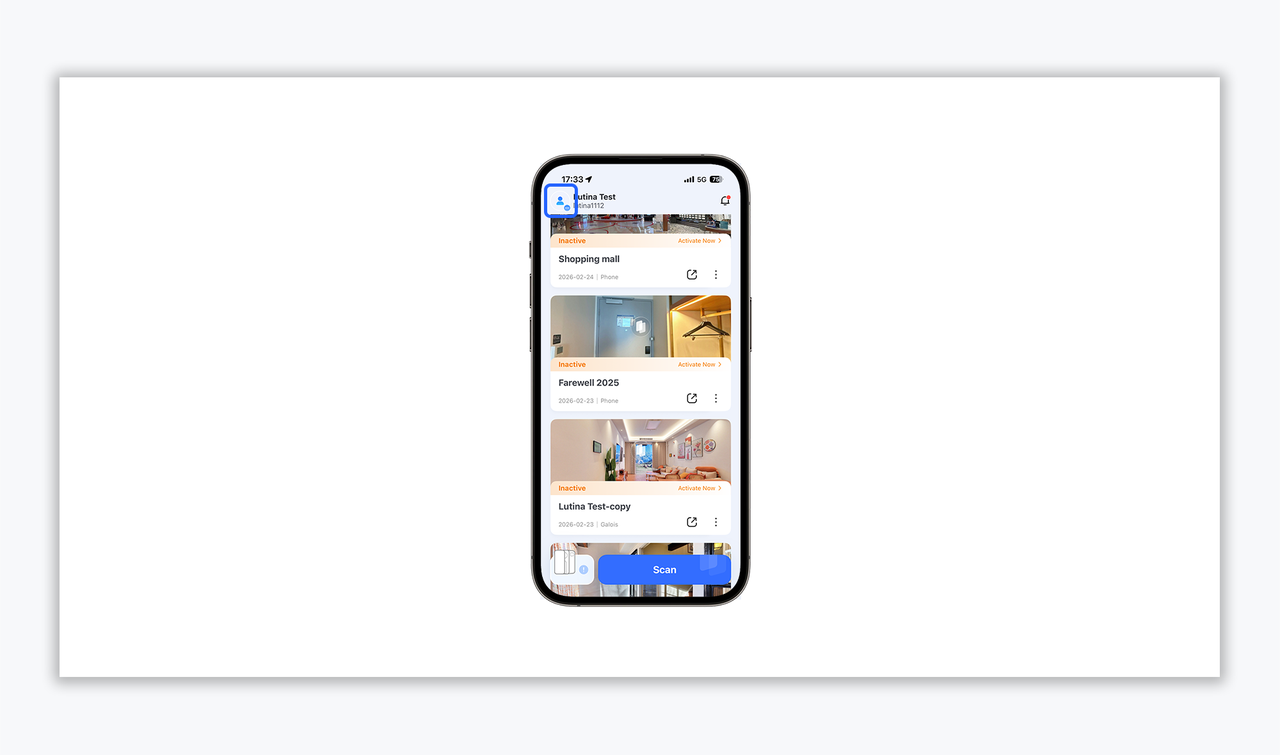
  1. After launching the Realsee app, tap the User Avatar icon in the top-left corner to enter the personal management interface.
https://global-public.realsee-cdn.com/release/pagepress/DoYjsOpL/uploads/da194968-d2fd-4910-9c34-e80de26c132b.png
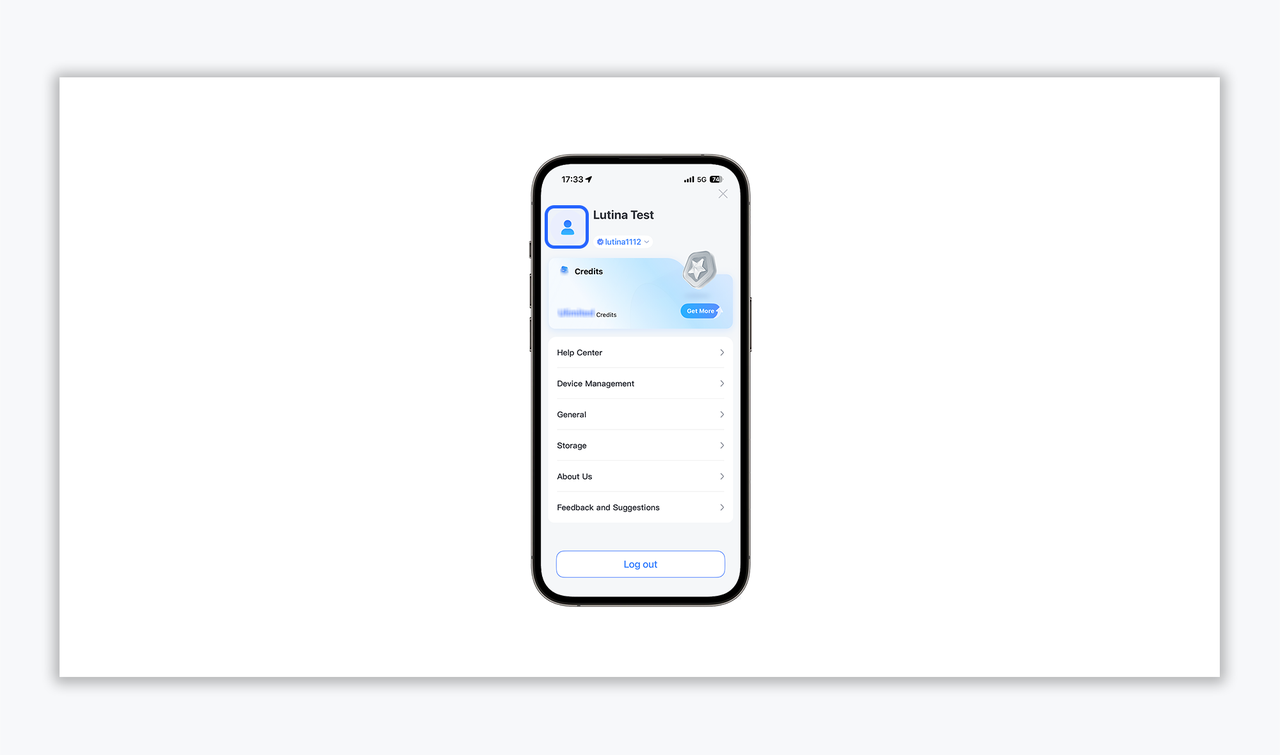
  1. On the Profile page, click the User Information section at the top to access the "Introduction" detail page.
https://global-public.realsee-cdn.com/release/pagepress/GNxtMnDo/uploads/19e8decb-8f19-45e9-a7a9-177567a1161c.png
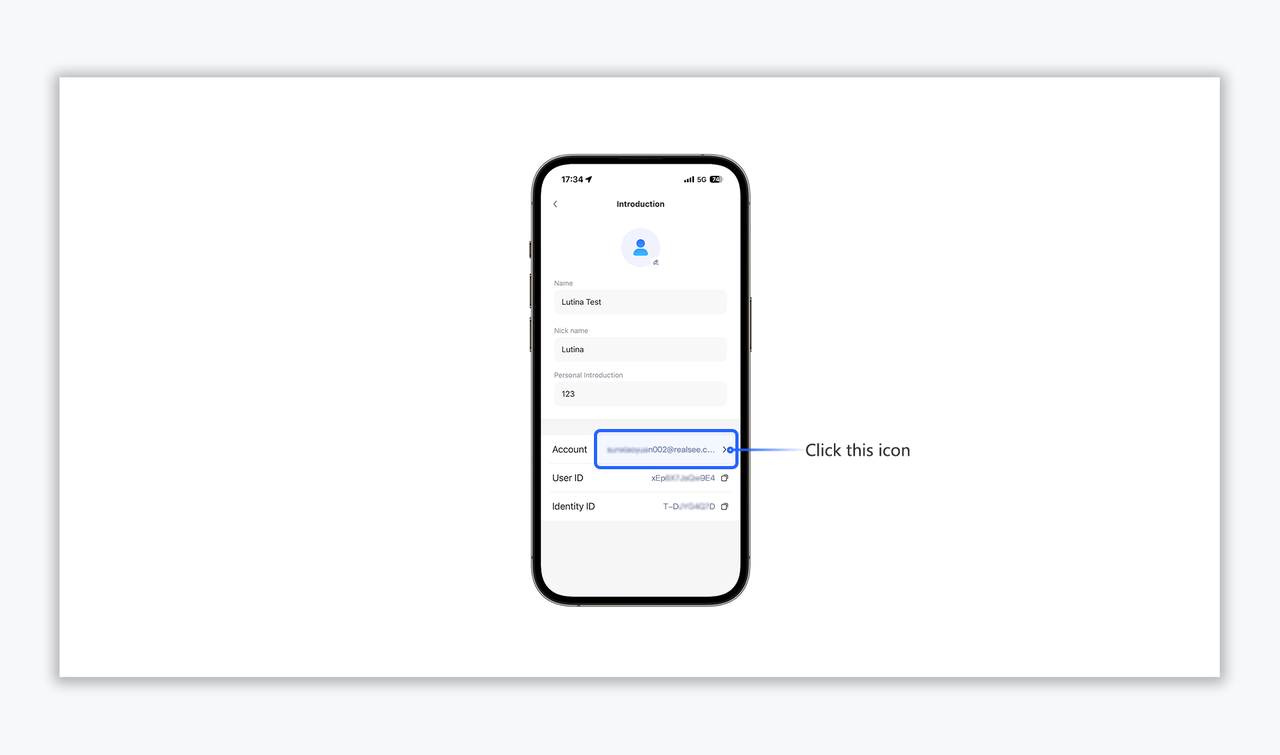
  1. Locate the "Account" field within the profile list and tap the corresponding arrow to enter the management page.
https://global-public.realsee-cdn.com/release/pagepress/CFmQgFqV/uploads/b8b9b423-14ab-47ba-85b4-a35d3ce9356a.png
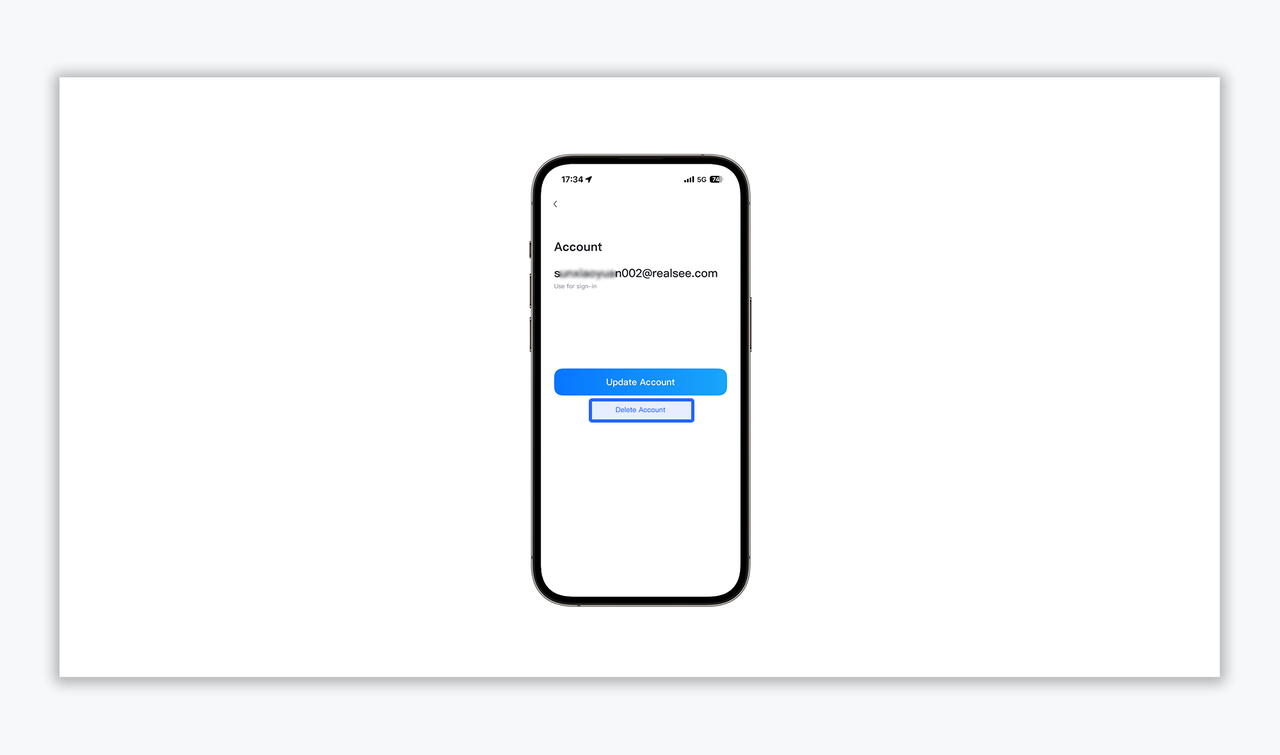
  1. At the bottom of the account management page, select "Delete Account".
https://global-public.realsee-cdn.com/release/pagepress/eVnUlxPL/uploads/c16a867e-3872-4bd3-853a-99636865abb3.png
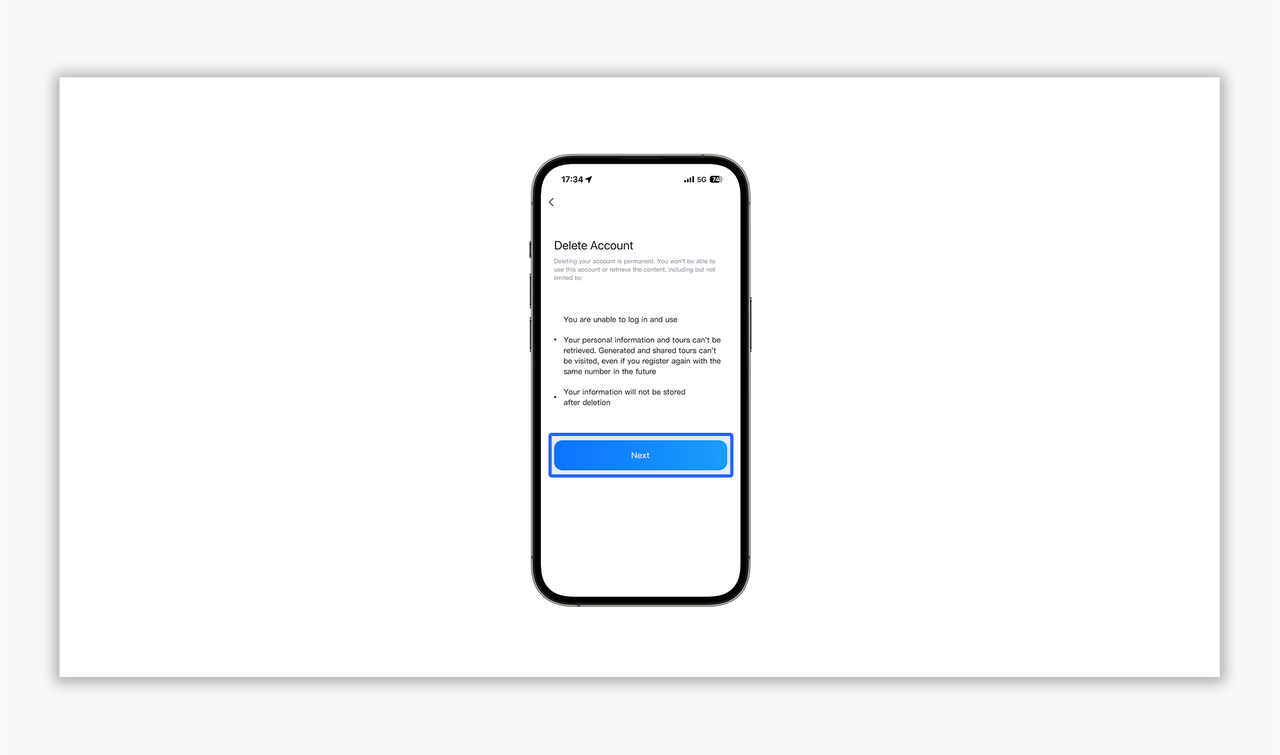
  1. Terms & Consequences Acknowledgment

Please carefully review the deletion terms.

Key consequences include:

  • Permanent loss of login access.
  • Irretrievable loss of all personal information and 3D digital assets (Tours).
  • Complete cessation of data storage upon deletion.
  • Click "Next" after confirming you understand these risks.
https://global-public.realsee-cdn.com/release/pagepress/AVgqzRYt/uploads/1099351d-40b7-48d7-a3cb-95308cf34a7e.png
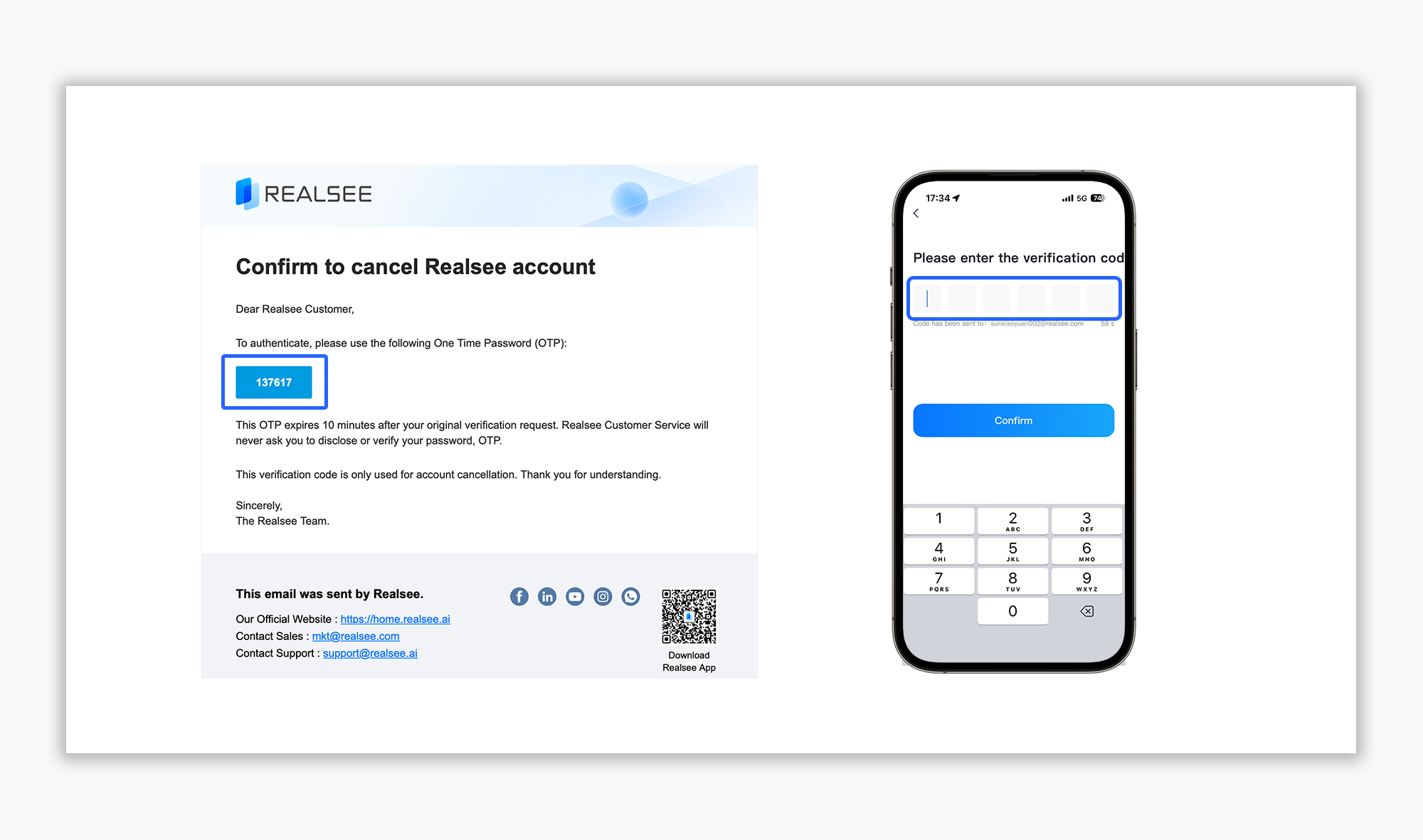
  1. Security Verification
  • OTP Retrieval: A 6-digit One Time Password (OTP) will be sent to your registered email address.
  • Verification: Enter the OTP within 10 minutes and click "Confirm" to finalize the process.
https://global-public.realsee-cdn.com/release/pagepress/XTlUaLGU/uploads/c107475b-3b89-44a6-920d-58ccb6c95c07.png

Please Note: Account deletion is a permanent and irreversible process. We strongly advise you to proceed with caution and ensure all critical data has been backed up.

Should you have any questions or require further assistance, please do not hesitate to contact our official support team(support@realsee.ai)

Was this article helpful?

YesNo

Previous

Realsee App Project and Space Management Guide

Next

Galois Capture: Frequent Questions & Solutions
  • Product
    • Galois
    • Realsee G1
    • 360 Camera
    • Mobile phone
  • Solution
    • Real Estate Photographer
    • Real Estate Agency
  • Resources
    • About Us
    • Partners
  • Quick links
    • Realsee App
    • Console
    • Help Center
    • Legal agreements
  • Contact Us
    LinkedInFaceBookYoutubeXRedditWhatsApp
Realsee
©Copyright 2026 Beike Realsee Technology (HK) Limited All rights reserved|Various trademarks held by their respective owners.