REALSEE
  • Product
  • Solution
  • Gallery
  • Support
  • Resources
  • Store
  • Product
    The effortless all-in-one 3D tour solution that doubles your profits.
    • Capture Device
      • Galois
        GaloisHot
        3D LiDAR Camera
      • REALSEE G1
        REALSEE G1
        Smartphone Gimbal
      • 360 Camera
        360 Camera
        Wide Compatibility
      • Mobile phone
        Mobile phone
        Capture Easily
    • 3D Tour Features
      • Editor Features
        Editor FeaturesHot
        Powerful 3D Tour Editing Features
  • Solutions
    Leading 3D Tour Producer, Tailored for Real Estate
    • Client Type
      • Real Estate Photographer
        Real Estate Photographer
        Effortless 3D tour, double your profits in no time.
      • Real Estate Agency
        Real Estate Agency
        Boost your listings with Realsee's pay-as-you-go 3D tour solution.
      • Real Estate Brokerage
        Real Estate Brokerage
        Professional-grade 3D solutions for real estate brokers.
    • Case Study
      • Commercial Real Estate
        Commercial Real Estate
        Professional LiDAR scanning for commercial spaces.
      • Residential Real Estate
        Residential Real Estate
        LiDAR-powered virtual home tours that accelerate sales.
      • Museum
        Museum
        Immerse visitors with LiDAR-captured 3D museum experiences.
      • Travel & Tourism
        Travel & Tourism
        Transform destinations with interactive LiDAR 3D tours.
  • Support
    Get help and resources for our services.
    • Support
      • Help Center
        Help Center
        Find FAQs and guides for your questions.
      • Contact Us
        Contact Us
        Contact our team for personalized inquiries.
  • Resources
    Explore valuable information and insights.
    • Resources
      • About Us
        About Us
        Learn more about our mission and team.
      • What's New
        What's New
        Discover what's new and improved.
      • Blog
        Blog
        Stay updated with latest news & creator stories via our blog.
      • Partners
        Partners
        Discover partnership opportunities with us.
  • Store
    Browse our products and services.
    • Plans
      • Credit Plans
        Credit Plans
        Purchase Realsee credits for 3D tour hosting and downloads with a pay-as-you-go option.
      • New User Free Trial
        New User Free Trial
        Learn about free benefits for new users.
    • Realsee Cameras
      • Galois M2
        Galois M2
        Purchase the professional LiDAR camera to elevate your business.
      • G1 Gimbal
        G1 Gimbal
        Contact sales for G1 gimbal inquiries.
Contact UsContact Us
Choose Language
English
็ฎ€ไฝ“ไธญๆ–‡
Log inSign up
E-mail us
mkt@realsee.com
REALSEE
Product
  • Product
    The effortless all-in-one 3D tour solution that doubles your profits.
    • Capture Device
      • Galois
        GaloisHot
        3D LiDAR Camera
      • REALSEE G1
        REALSEE G1
        Smartphone Gimbal
      • 360 Camera
        360 Camera
        Wide Compatibility
      • Mobile phone
        Mobile phone
        Capture Easily
    • 3D Tour Features
      • Editor Features
        Editor FeaturesHot
        Powerful 3D Tour Editing Features
Deliverables
  • Deliverables Downloads
Solution
  • Solutions
    Leading 3D Tour Producer, Tailored for Real Estate
    • Client Type
      • Real Estate Photographer
        Real Estate Photographer
        Effortless 3D tour, double your profits in no time.
      • Real Estate Agency
        Real Estate Agency
        Boost your listings with Realsee's pay-as-you-go 3D tour solution.
      • Real Estate Brokerage
        Real Estate Brokerage
        Professional-grade 3D solutions for real estate brokers.
    • Case Study
      • Commercial Real Estate
        Commercial Real Estate
        Professional LiDAR scanning for commercial spaces.
      • Residential Real Estate
        Residential Real Estate
        LiDAR-powered virtual home tours that accelerate sales.
      • Museum
        Museum
        Immerse visitors with LiDAR-captured 3D museum experiences.
      • Travel & Tourism
        Travel & Tourism
        Transform destinations with interactive LiDAR 3D tours.
Gallery
Support
  • Support
    Get help and resources for our services.
    • Support
      • Help Center
        Help Center
        Find FAQs and guides for your questions.
      • Contact Us
        Contact Us
        Contact our team for personalized inquiries.
Resources
  • Resources
    Explore valuable information and insights.
    • Resources
      • About Us
        About Us
        Learn more about our mission and team.
      • What's New
        What's New
        Discover what's new and improved.
      • Blog
        Blog
        Stay updated with latest news & creator stories via our blog.
      • Partners
        Partners
        Discover partnership opportunities with us.
Store
  • Store
    Browse our products and services.
    • Plans
      • Credit Plans
        Credit Plans
        Purchase Realsee credits for 3D tour hosting and downloads with a pay-as-you-go option.
      • New User Free Trial
        New User Free Trial
        Learn about free benefits for new users.
    • Realsee Cameras
      • Galois M2
        Galois M2
        Purchase the professional LiDAR camera to elevate your business.
      • G1 Gimbal
        G1 Gimbal
        Contact sales for G1 gimbal inquiries.
  • Contact Us
  • En
    • English
    • ็ฎ€ไฝ“ไธญๆ–‡
  • Get Started Free
Help Center
  1. What's New
  2. Realsee Nov Update: Boost Efficiency for Your Business
  • Realsee Nov Update: Boost Efficiency for Your Business
  • New Release: Manual Floor Plan Service
    • New Release: Manual Floor Plan Service
  • 2025 October Release
    • Explore Realsee October Innovations
  • 2025 September Release
    • What's New For Realsee in September
  • 2025 August Release
    • Realsee August Upgrade: Optimized Features, Enhanced Experience
    • Announcement: Realsee and Insta360 X5 Compatibility Completed
    • August 10, 2025
  • 2025 July Release
    • July 22, 2025
    • July 04, 2025
  • 2025 June Release
    • June 19, 2025
    • June 6, 2025
  • 2025 May Release
    • May 22, 2025
    • May 8, 2025
  • 2025 April Release
    • April 18, 2025
  • 2025 March Release
    • March 26, 2025
    • March 11, 2025
  • 2025 February Release
    • February 21, 2025
    • February 10, 2025
  • 2025 January Release
    • January 18, 2025
  • Realsee Nov Update: Boost Efficiency for Your Business
  • New Release: Manual Floor Plan Service
    • New Release: Manual Floor Plan Service
  • 2025 October Release
    • Explore Realsee October Innovations
  • 2025 September Release
    • What's New For Realsee in September
  • 2025 August Release
    • Realsee August Upgrade: Optimized Features, Enhanced Experience
    • Announcement: Realsee and Insta360 X5 Compatibility Completed
    • August 10, 2025
  • 2025 July Release
    • July 22, 2025
    • July 04, 2025
  • 2025 June Release
    • June 19, 2025
    • June 6, 2025
  • 2025 May Release
    • May 22, 2025
    • May 8, 2025
  • 2025 April Release
    • April 18, 2025
  • 2025 March Release
    • March 26, 2025
    • March 11, 2025
  • 2025 February Release
    • February 21, 2025
    • February 10, 2025
  • 2025 January Release
    • January 18, 2025

Realsee Nov Update: Boost Efficiency for Your Business

Recent Update: December 04, 2025

Realsee November Product Update Announcement

Golden November brings exciting upgrades! Realsee focuses on core feature enhancements, visual experience optimizations, and operational efficiency improvements, proudly launching a series of practical feature updates covering CAD design, Manual floor plan services, spatial presentation, and usability. Below are the key highlights of this update:

https://global-public.realsee-cdn.com/release/pagepress/xxMQqWWL/uploads/54b8024d-a38d-440d-b154-96530de0b88c.png

I. CAD Function Officially Launched โ€“ Free Download for a Limited Time

Realsee CAD Editor is now officially live! As a core tool in engineering, architecture, manufacturing, and other fields, Computer-Aided Design (CAD) enables users to quickly create, modify, analyze, and optimize design drawings and models based on 3D Tour projects. The newly launched CAD Editor supports core functions such as wall line adjustment, door/window addition with precision parameter editing, multiple types of annotations (height, area, text, etc.), meeting professional design needs.

โœจ Limited-time Offer: CAD files are currently available for free download โ€“ we welcome all users to experience it!

๐Ÿ“ฉ Feedback Channel: For any product-related suggestions or questions, please contact lutina.suen@realsee.ai

๐Ÿ“š Learn More: CAD Editor User Guide

II. Manual Floor Plan Service Newly Launched

Manual Floor Plan Service is officially launched, tailored for real estate showcases, marketing material creation, spatial communication, and other scenarios. No manual measurement or sketching is required โ€“ based on your 3D Tour data, our professional drafting team will conduct manual verification and drawing to ensure the floor plan is clear, standardized, accurate, and compliant.๐ŸŒŸ Core Advantages:

  • Full Device Compatibility: Supports projects from Galois LiDAR devices, G1, 360ยฐ cameras and Pano to 3D.
  • Flexible Customization: Offers paid optimization options such as color styles and furniture icons, plus free show/hide toggles for room names, dimensions, compasses, etc. โ€“ generate marketing versions, technical versions, and more;
  • Efficient Delivery: Standard delivery within 2 business days; Express delivery within 1 business day (additional fee applies);

๐Ÿ“š Learn More: Manual Floor Plan Service

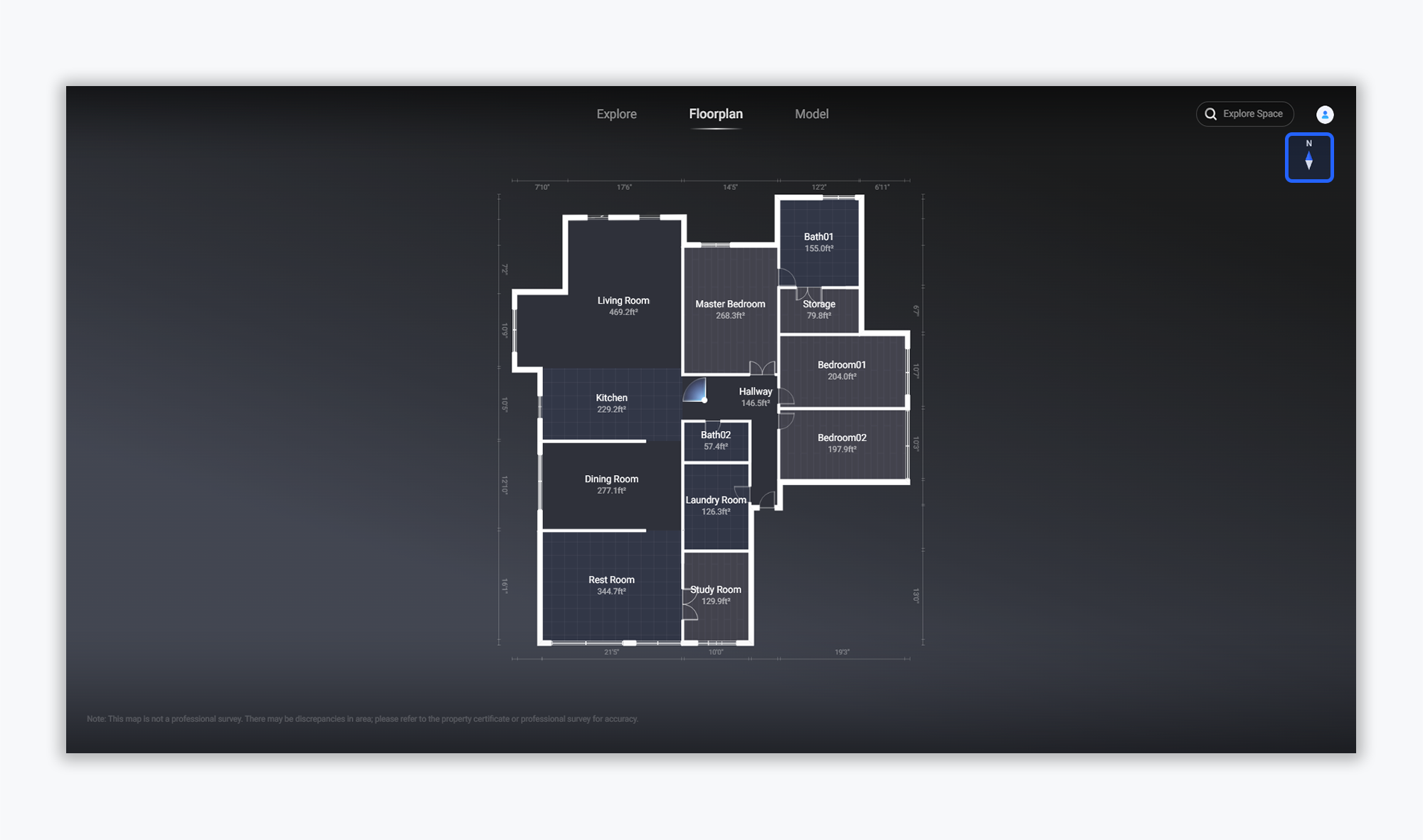
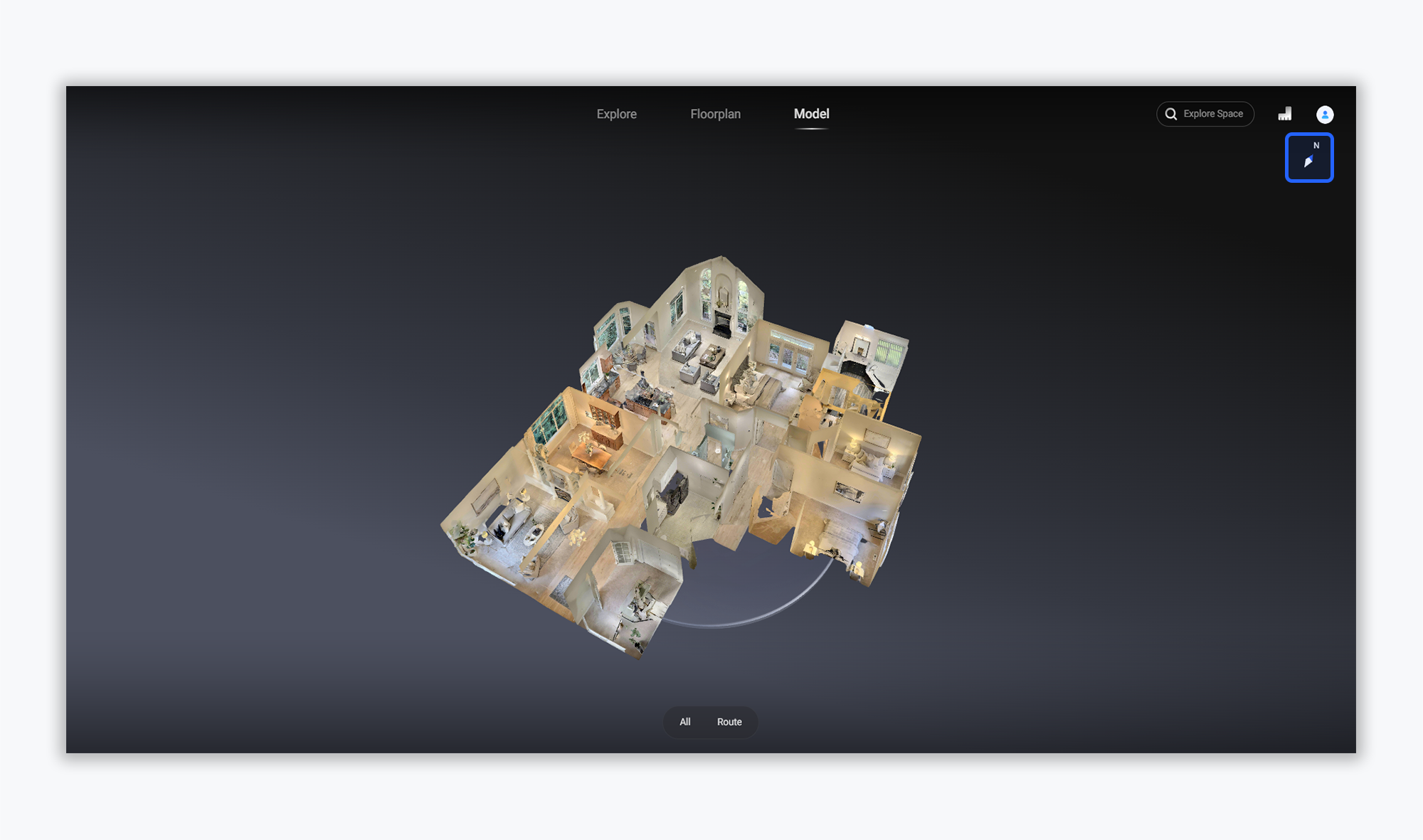
III. 3D Compass Effect Optimization on VR Model/Floor Plan Pages

Addressing the weak visual recognition of directions in the original floor plans, we have fully upgraded the 3D compass on VR model and floor plan pages. The optimized 3D compass not only retains its core direction-guiding function but also adds three-dimensional visual design and futuristic effects. In model mode, it provides a more intuitive spatial orientation reference, helping users quickly establish spatial awareness and enhance browsing experience.
https://global-public.realsee-cdn.com/release/pagepress/wThjsHZd/uploads/5855e0d2-bae9-4037-9e73-caef48f6dde0.png


https://global-public.realsee-cdn.com/release/pagepress/wJFZteMb/uploads/540aee31-e4ef-4f71-b9b6-68d91032c3e2.png


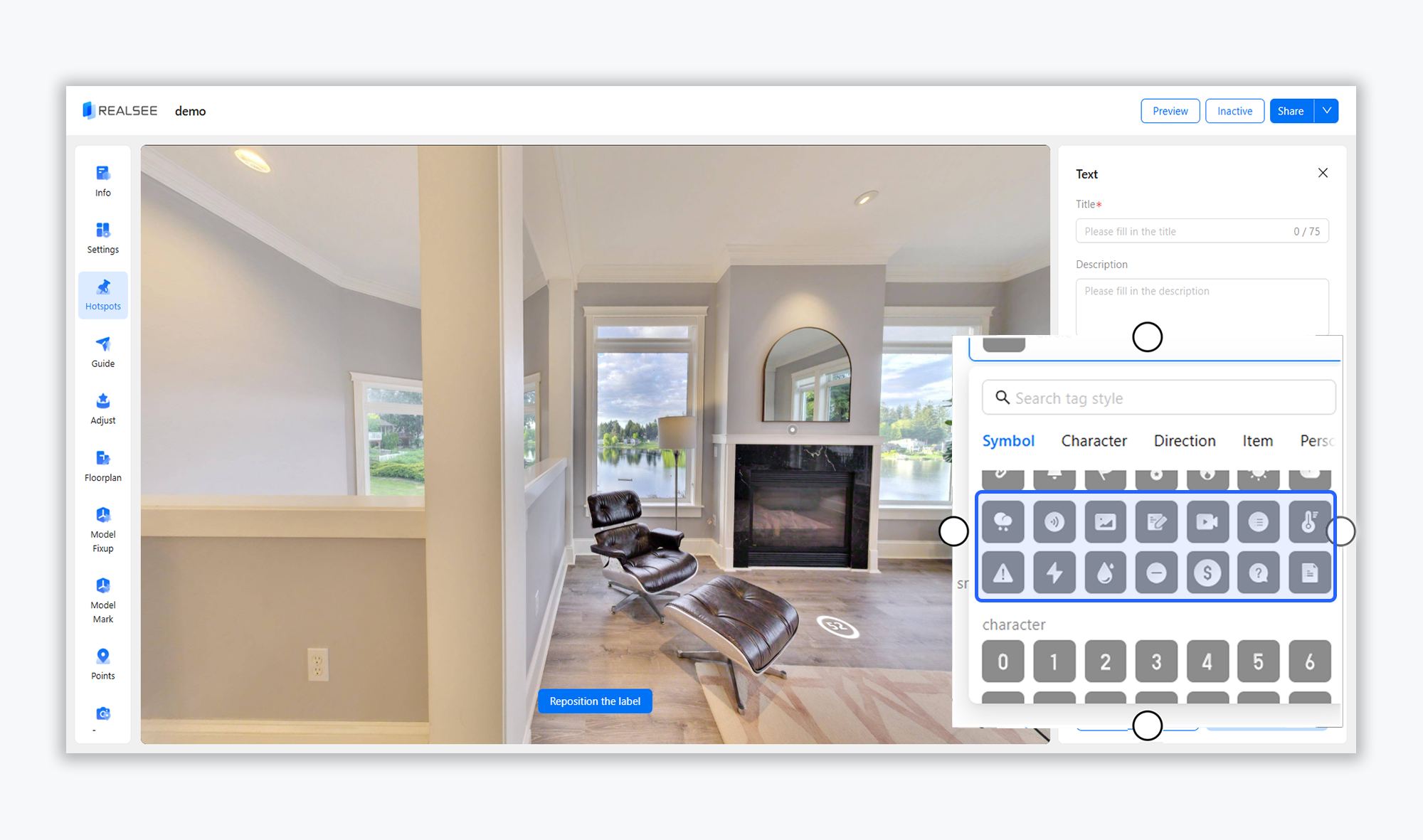
IV. Hotspot Tags Added with Practical Icons (e.g., Thermometer)

To enrich the dimensions of spatial information annotation, the hotspot tag library has been updated with practical icons such as a thermometer. Users can use exclusive icons to mark key information like spatial temperature and facility attributes based on scenario needs, making spatial presentation more detailed and targeted, and helping viewers quickly grasp core highlights.
https://global-public.realsee-cdn.com/release/pagepress/bTsuSljA/uploads/8a0ac89e-d85e-4050-9ce6-9174cbef08f2.png


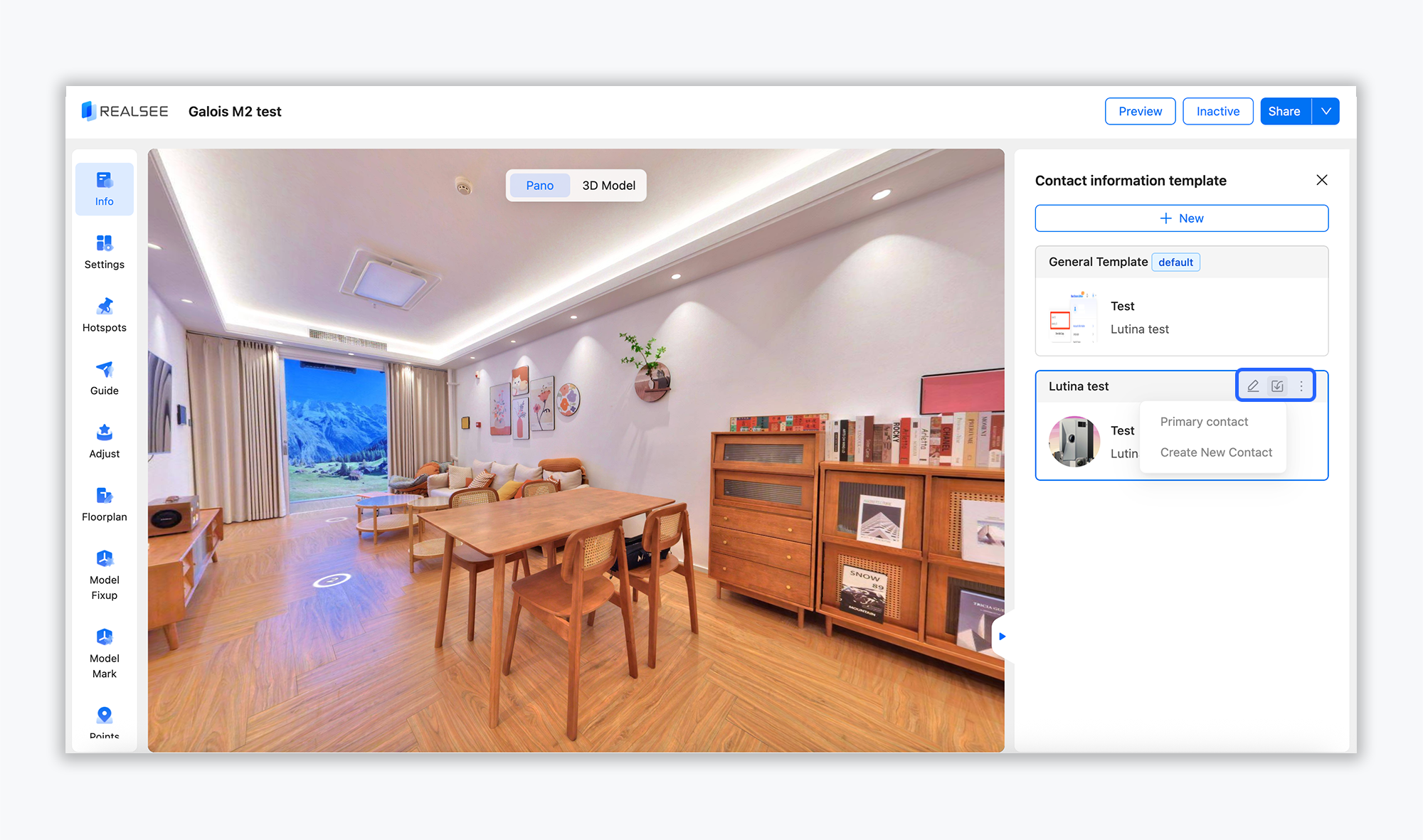
V. Contact Import Supports Direct Application from Template List

Boost operational efficiency! The contact import function now supports direct application from the template list. No extra tedious steps are needed โ€“ you can directly select and apply contact information from the template list, significantly reducing repetitive operations and making contact management more convenient and efficient.
https://global-public.realsee-cdn.com/release/pagepress/clPfFPmN/uploads/99f1cd4b-78ed-4c51-954a-7a0b714007d0.png


VI. Snapshot Supports Batch Download โ€“ More Efficient Operations

To meet users' multi-scenario export needs, the snapshot function now supports batch download! No need to save files one by one โ€“ export all required snapshot files at once, saving valuable time.


Feedback & Support

This update aims to deliver a superior product experience. We encourage all users to explore the new features! If you encounter any issues or have further optimization suggestions during use, please contact us via support@realsee.ai. Realsee will continue to focus on user needs, continuously iterate and optimize product functions, and bring you more professional and convenient spatial digital solutions!

Was this article helpful?

YesNo

Next

New Release: Manual Floor Plan Service
  • Product
    • Galois
    • Realsee G1
    • 360 Camera
    • Mobile phone
  • Solution
    • Real Estate Photographer
    • Real Estate Agency
  • Resources
    • About Us
    • Partners
  • Quick links
    • Realsee App
    • Console
    • Help Center
    • Legal agreements
  • Contact Us
    LinkedInFaceBookYoutubeXRedditWhatsApp
Realsee
ยฉCopyright 2024 Beike Realsee Technology (HK) Limited All rights reserved|Various trademarks held by their respective owners.