Capture, share & collaborate: 3D virtual tour made easy - Realsee
  • Sign In
  • Product
  • Solution
  • Gallery
  • Support
  • Resources
  • Store
  • Product
    The effortless all-in-one 3D tour solution that doubles your profits.
    • Capture Device
      • Galois
        GaloisHot
        3D LiDAR Camera
      • REALSEE G1
        REALSEE G1
        Smartphone Gimbal
      • 360 Camera
        360 Camera
        Wide Compatibility
      • Mobile phone
        Mobile phone
        Capture Easily
    • 3D Tour Features
      • Editor Features
        Editor FeaturesHot
        Powerful 3D Tour Editing Features
  • Solutions
    Leading 3D Tour Producer, Tailored for Real Estate
    • Client Type
      • Real Estate Photographer
        Real Estate Photographer
        Effortless 3D tour, double your profits in no time.
      • Real Estate Agency
        Real Estate Agency
        Boost your listings with Realsee's pay-as-you-go 3D tour solution.
      • Real Estate Brokerage
        Real Estate Brokerage
        Professional-grade 3D solutions for real estate brokers.
    • Case Study
      • Commercial Real Estate
        Commercial Real Estate
        Professional LiDAR scanning for commercial spaces.
      • Residential Real Estate
        Residential Real Estate
        LiDAR-powered virtual home tours that accelerate sales.
      • Museum
        Museum
        Immerse visitors with LiDAR-captured 3D museum experiences.
      • Travel & Tourism
        Travel & Tourism
        Transform destinations with interactive LiDAR 3D tours.
  • Support
    Get help and resources for our services.
    • Support
      • Help Center
        Help Center
        Find FAQs and guides for your questions.
      • Contact Us
        Contact Us
        Contact our team for personalized inquiries.
  • Resources
    Explore valuable information and insights.
    • Resources
      • About Us
        About Us
        Learn more about our mission and team.
      • What's New
        What's New
        Discover what's new and improved.
      • Blog
        Blog
        Stay updated with latest news & creator stories via our blog.
      • Partners
        Partners
        Discover partnership opportunities with us.
  • Store
    Browse our products and services.
    • Plans
      • Credit Plans
        Credit Plans
        Purchase Realsee credits for 3D tour hosting and downloads with a pay-as-you-go option.
      • New User Free Trial
        New User Free Trial
        Learn about free benefits for new users.
    • Realsee Cameras
      • Galois M2
        Galois M2
        Purchase the professional LiDAR camera to elevate your business.
      • G1 Gimbal
        G1 Gimbal
        Contact sales for G1 gimbal inquiries.
Contact Us
Capture, share & collaborate: 3D virtual tour made easy - Realsee
Product
  • Product
    The effortless all-in-one 3D tour solution that doubles your profits.
    • Capture Device
      • Galois
        GaloisHot
        3D LiDAR Camera
      • REALSEE G1
        REALSEE G1
        Smartphone Gimbal
      • 360 Camera
        360 Camera
        Wide Compatibility
      • Mobile phone
        Mobile phone
        Capture Easily
    • 3D Tour Features
      • Editor Features
        Editor FeaturesHot
        Powerful 3D Tour Editing Features
Deliverables
  • Deliverables Downloads
Solution
  • Solutions
    Leading 3D Tour Producer, Tailored for Real Estate
    • Client Type
      • Real Estate Photographer
        Real Estate Photographer
        Effortless 3D tour, double your profits in no time.
      • Real Estate Agency
        Real Estate Agency
        Boost your listings with Realsee's pay-as-you-go 3D tour solution.
      • Real Estate Brokerage
        Real Estate Brokerage
        Professional-grade 3D solutions for real estate brokers.
    • Case Study
      • Commercial Real Estate
        Commercial Real Estate
        Professional LiDAR scanning for commercial spaces.
      • Residential Real Estate
        Residential Real Estate
        LiDAR-powered virtual home tours that accelerate sales.
      • Museum
        Museum
        Immerse visitors with LiDAR-captured 3D museum experiences.
      • Travel & Tourism
        Travel & Tourism
        Transform destinations with interactive LiDAR 3D tours.
Gallery
Support
  • Support
    Get help and resources for our services.
    • Support
      • Help Center
        Help Center
        Find FAQs and guides for your questions.
      • Contact Us
        Contact Us
        Contact our team for personalized inquiries.
Resources
  • Resources
    Explore valuable information and insights.
    • Resources
      • About Us
        About Us
        Learn more about our mission and team.
      • What's New
        What's New
        Discover what's new and improved.
      • Blog
        Blog
        Stay updated with latest news & creator stories via our blog.
      • Partners
        Partners
        Discover partnership opportunities with us.
Store
  • Store
    Browse our products and services.
    • Plans
      • Credit Plans
        Credit Plans
        Purchase Realsee credits for 3D tour hosting and downloads with a pay-as-you-go option.
      • New User Free Trial
        New User Free Trial
        Learn about free benefits for new users.
    • Realsee Cameras
      • Galois M2
        Galois M2
        Purchase the professional LiDAR camera to elevate your business.
      • G1 Gimbal
        G1 Gimbal
        Contact sales for G1 gimbal inquiries.
  • Contact Us
  • Sign In
  • Get Started Free
Help Center
  1. What's New
  2. 2026 Realsee Product Updates
  3. What's New For Realsee in January
  • 2026 Realsee Product Updates
    • What's New For Realsee in January
  • 2025 Realsee Product Updates
    • What's New For Realsee in December
    • What's New For Realsee in November: Boost Efficiency for Your Business
    • New Release: Manual Floor Plan Service
    • What's New For Realsee in October
    • What's New For Realsee in September
    • Realsee August Upgrade: Optimized Features, Enhanced Experience
    • Announcement: Realsee and Insta360 X5 Compatibility Completed
    • August 10, 2025
    • July 22, 2025
    • July 04, 2025
    • June 19, 2025
    • June 6, 2025
    • May 22, 2025
    • May 8, 2025
    • April 18, 2025
    • March 26, 2025
    • March 11, 2025
    • February 21, 2025
    • February 10, 2025
    • January 18, 2025
  • 2026 Realsee Product Updates
    • What's New For Realsee in January
  • 2025 Realsee Product Updates
    • What's New For Realsee in December
    • What's New For Realsee in November: Boost Efficiency for Your Business
    • New Release: Manual Floor Plan Service
    • What's New For Realsee in October
    • What's New For Realsee in September
    • Realsee August Upgrade: Optimized Features, Enhanced Experience
    • Announcement: Realsee and Insta360 X5 Compatibility Completed
    • August 10, 2025
    • July 22, 2025
    • July 04, 2025
    • June 19, 2025
    • June 6, 2025
    • May 22, 2025
    • May 8, 2025
    • April 18, 2025
    • March 26, 2025
    • March 11, 2025
    • February 21, 2025
    • February 10, 2025
    • January 18, 2025

What's New For Realsee in January

Recent Update: February 05, 2026

Ⅰ. Guide Point Navigation: Floor-Based Custom Sorting

Key Highlights

  • Logic-First Floor Grouping: By default, guide points are now intelligently organized by floor level (for example, B1 → 1F → 2F). This creates a clear, intuitive flow that helps viewers move naturally through the space from the ground up.
  • Total Drag-and-Drop Flexibility: The Editor now supports complete reordering. You can move entire floor groups or rearrange individual guide points within a floor, making it easy to highlight the most impressive areas of your space.
  • True WYSIWYG Workflow: What you see is what you get. The order you set in the Editor is exactly how it appears in the VR experience―no guesswork required. Just a smooth, streamlined curation process.

Why It Matters

  • Spatial Consistency: Deliver a professional navigation experience that feels natural and easy to follow.
  • Tailored Presentations: Whether you want to showcase the penthouse first or guide viewers through a traditional floor-by-floor walkthrough, you’re in full control.
  • Efficiency: Save time in post-production by organizing everything in one clear, visual interface.

How to get started?

Simply open your Tour Editor, navigate to the Guide Point list, and start dragging to reorder. Your changes will sync instantly to the final VR experience.


Ⅱ. New in Editor: Expand Your Creative Horizons with Enhanced Filters 🎨

  • Beyond the Basics: We’ve significantly expanded our filter library, going well beyond the original three options. You can now choose from a wide range of cinematic styles designed to complement different lighting conditions and property types.
  • Instant Ambience Control: Whether you’re going for a warm, welcoming residential vibe or a clean, high-end commercial look, you can instantly fine-tune the overall look and feel of your tour with just one click.


Ⅲ. Optimization: Expanded Profile Introductions

Tell your story more completely with a longer personal profile introduction.

  • More Room for Your Story: We’ve expanded the character limit for the Introduction field in the Personal Center from 11 to 500 characters, giving you plenty of space to express yourself.
  • Enhanced Professionalism: No more cutting your bio short. Highlight your expertise, include detailed contact information, or share your brand story in full to build stronger trust with your audience.

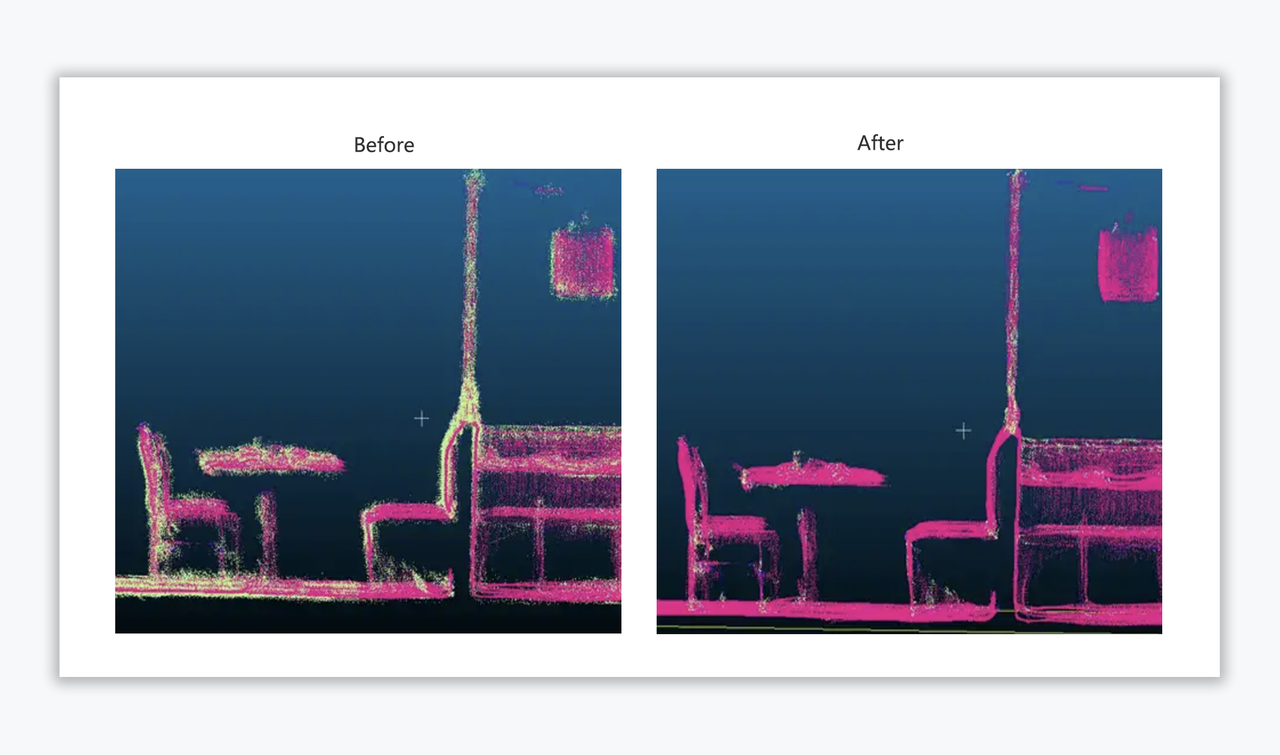
Ⅳ. Point Cloud Processing: Advanced Denoising & Ghosting Removal

We have significantly enhanced our point cloud post-processing algorithms for data captured by the Galois scanner, particularly for Ultra-high density capture modes. This update focuses on the precise removal of noise and "ghosting" artifacts caused by movement or reflective surfaces.

  • The Breakthrough: Our optimized algorithm now strikes a sophisticated balance—aggressively stripping away environmental noise while ensuring high-fidelity reconstruction of thin or smaller structures (such as chair backs or objects approximately 0.25m² in size), which were previously prone to over-filtering.
https://global-public.realsee-cdn.com/release/pagepress/pRqQXOPz/uploads/7787cb28-8610-4d27-9855-5fc2ea9304fa.png

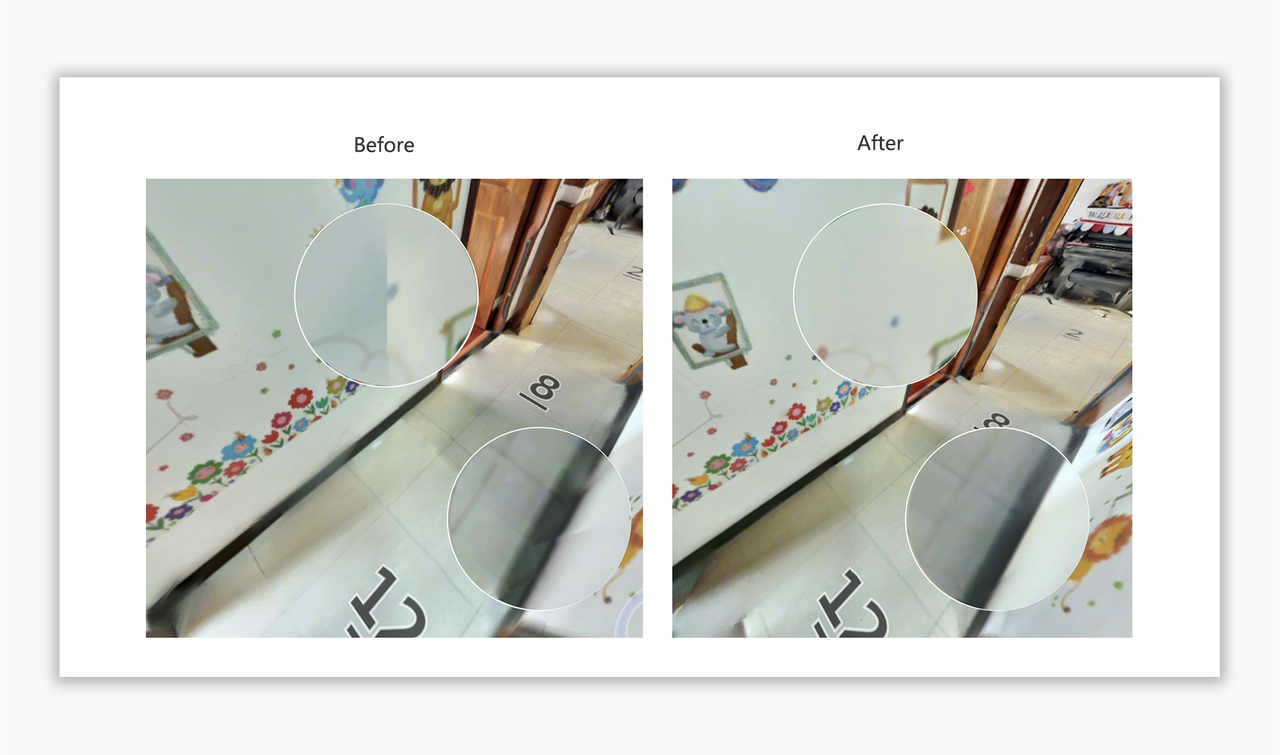
Ⅴ. LOD Model: Seamless Texture & Brightness Consistency

To improve the visual quality of large-scale scenes, we have optimized the Texture Consistency across LOD (Level of Detail) block boundaries.

  • The Improvement: This update specifically addresses the "tiling" or "seaming" effect often seen at the edges of model segments. By fine-tuning our global illumination and brightness alignment algorithms, we ensure that texture transitions between blocks are seamless, maintaining uniform color temperature and brightness across the entire mesh.
https://global-public.realsee-cdn.com/release/pagepress/rKTmnlVg/uploads/e686fb19-8ef8-4965-af16-a4323bf864b1.png


https://global-public.realsee-cdn.com/release/pagepress/WQLlUYJU/uploads/ac1d401b-24ce-4c39-9593-4a9b55d85cfd.png

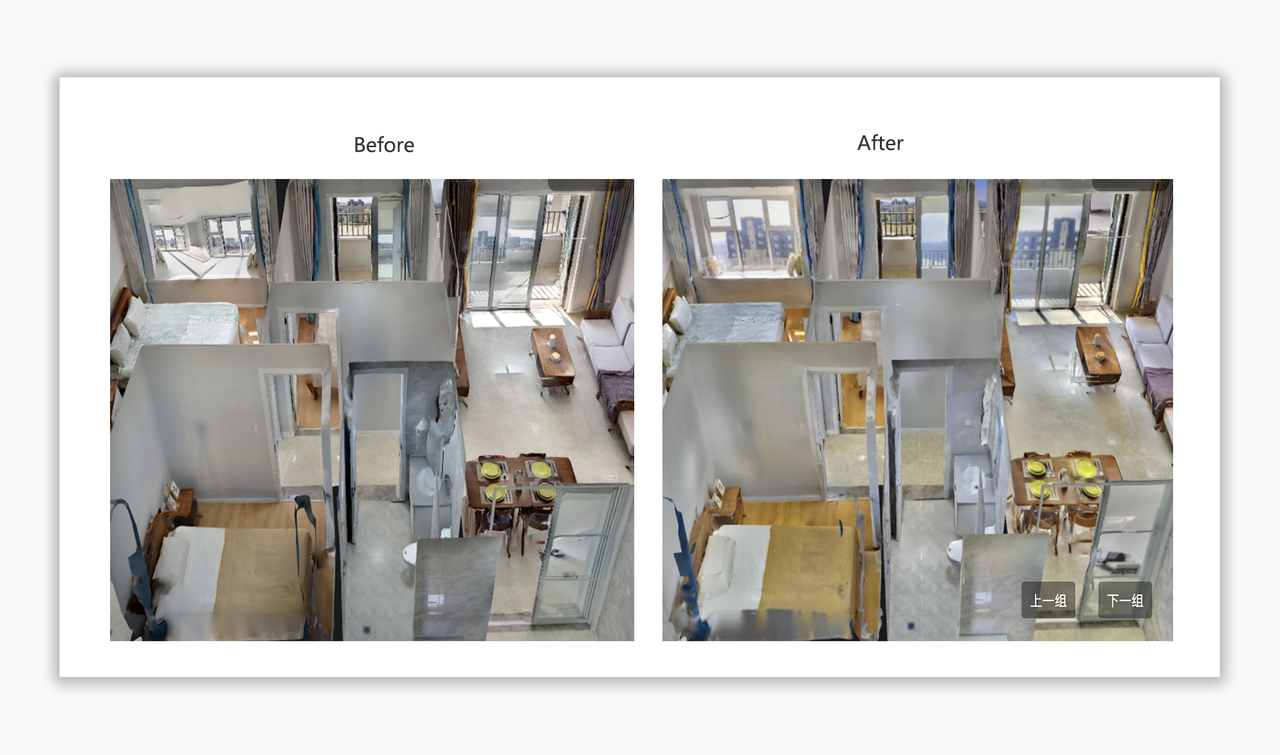
Ⅵ. Reflective Surface Handling: Mirror & Glass Texture Refinement

We have upgraded our automatic identification and rendering logic for Glass and Mirrors to deliver more realistic visual outcomes.

  • The Improvement: This iteration optimizes the Best-View Selection Strategy for reflective surfaces. By intelligently selecting the most orthorectified (straight-on) perspective from the source imagery, we have corrected distortions and misalignments in mirror textures, ensuring that the reflected view looks accurate and geometrically "upright" from a first-person perspective.
https://global-public.realsee-cdn.com/release/pagepress/PdmBnCsU/uploads/e1545f94-d591-4dce-aa7b-6fde94538c69.png
🗣️ Feedback: Have any suggestions or feedback on our product features? Please feel free to reach out to me at Support@realsee.ai

Was this article helpful?

YesNo
  • Product
    • Galois
    • Realsee G1
    • 360 Camera
    • Mobile phone
  • Solution
    • Real Estate Photographer
    • Real Estate Agency
  • Resources
    • About Us
    • Partners
  • Quick links
    • Realsee App
    • Console
    • Help Center
    • Legal agreements
  • Contact Us
    LinkedInFaceBookYoutubeXRedditWhatsApp
Realsee
©Copyright 2026 Beike Realsee Technology (HK) Limited All rights reserved|Various trademarks held by their respective owners.